Azure DevOps Pipeline
For automated monitoring we use an Azure DevOps pipeline with separate service connections per tenant. Each one uses workload identity federation to authenticate with read-only permissions.
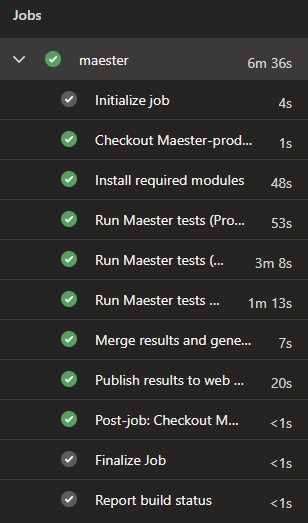
The pipeline uses a ${{ each }} loop to generate a step per tenant, so adding more tenants is just adding another entry to the YAML.
Prerequisites
Per tenant:
- An app registration with the required Microsoft Graph read permissions granted with admin consent
- A workload identity federation service connection in Azure DevOps pointing to the app registration
For publishing:
- An Azure Web App to host the report (see Maester results on Azure Web App for how to set one up)
- A service connection with Website Contributor role on the web app
Maester module:
- Latest version with multi-tenant support (
Merge-MtMaesterResultandGet-MtHtmlReportare included)
This pipeline uses OAuth (federated credentials) for authenticating towards all services including Exchange Online, Security & Compliance and Microsoft Teams. No certificates or client secrets are needed.
Tenant parameters
Each tenant in the pipeline accepts the following parameters:
General
| Parameter | Required | Description |
|---|---|---|
name | Yes | Display name for the pipeline step, e.g. "Production" |
serviceConnection | Yes | Azure DevOps service connection name (workload identity federation) |
tenantId | Yes | Entra ID tenant ID |
clientId | Yes | App registration client ID in the target tenant |
environment | Yes | Cloud environment: Global, China, USGov, USGovDoD or Germany |
Exchange Online & Security and Compliance
| Parameter | Required | Description |
|---|---|---|
includeExchange | No | Run Exchange Online tests, defaults to false |
includeISSP | No | Run Security & Compliance tests, defaults to false. Requires includeExchange |
organizationName | When Exchange/ISSP enabled | Tenant primary domain (e.g. contoso.onmicrosoft.com) |
Microsoft Teams
| Parameter | Required | Description |
|---|---|---|
includeTeams | No | Run Microsoft Teams tests, defaults to false |
At minimum you only need the five general parameters per tenant. The rest defaults to false/empty:
parameters:
  - name: tenants
    type: object
    default:
      - name: Production
        serviceConnection: sc-maester-production
        tenantId: <your-production-tenant-id>
        clientId: <your-production-client-id>
        environment: Global
        includeTeams: true
        includeExchange: true
        includeISSP: true
        organizationName: contoso.onmicrosoft.com
      - name: Development
        serviceConnection: sc-maester-development
        tenantId: <your-dev-tenant-id>
        clientId: <your-dev-client-id>
        environment: Global
      - name: China
        serviceConnection: sc-maester-china
        tenantId: <your-china-tenant-id>
        clientId: <your-china-client-id>
        environment: China
Tenant isolation
Each tenant step explicitly disconnects from all services (Microsoft Graph, Exchange Online, Microsoft Teams) after the tests complete. This makes sure no session state leaks between tenant steps, even though all steps run in the same pipeline job on the same agent.
Always disconnect between tenant steps. Without explicit disconnects, a previous tenant's session could carry over and cause tests to run against the wrong tenant.
What the pipeline does
- Install modules once (Maester, Pester, Graph, Exchange, Teams)
- Run Maester tests for each tenant, connecting with the tenant's service connection and saving the results as JSON
- Merge all tenant JSON results into a single multi-tenant object using
Merge-MtMaesterResult - Generate a combined HTML report with
Get-MtHtmlReportand package it as a zip - Publish the zip to an Azure Web App using
Publish-AzWebApp
Full pipeline YAML
trigger: none

parameters:
  - name: tenants
    type: object
    default:
      - name: Production
        serviceConnection: sc-maester-production
        tenantId: <your-production-tenant-id>
        clientId: <your-production-client-id>
        environment: Global
        includeTeams: true
        includeExchange: true
        includeISSP: true
        organizationName: contoso.onmicrosoft.com
      - name: Development
        serviceConnection: sc-maester-development
        tenantId: <your-dev-tenant-id>
        clientId: <your-dev-client-id>
        environment: Global
      - name: China
        serviceConnection: sc-maester-china
        tenantId: <your-china-tenant-id>
        clientId: <your-china-client-id>
        environment: China

variables:
  PublishServiceConnection: sc-maester-publish
  WebAppSubscriptionId: <your-webapp-subscription-id>
  WebAppResourceGroup: rg-maester
  WebAppName: app-maester-example
  ResultsDir: $(Pipeline.Workspace)/maester-results

schedules:
- cron: "0 6 * * *"
  displayName: daily at 06:00
  always: true
  branches:
    include:
    - main

jobs:
- job: maester
  timeoutInMinutes: 0
  pool:
    vmImage: ubuntu-latest

  steps:
  - checkout: self
    fetchDepth: 1

  - task: AzurePowerShell@5
    inputs:
      azureSubscription: ${{ parameters.tenants[0].serviceConnection }}
      ScriptType: 'InlineScript'
      pwsh: true
      azurePowerShellVersion: latestVersion
      Inline: |
        Install-Module 'Maester', 'Pester', 'NuGet', 'PackageManagement', 'Microsoft.Graph.Authentication', 'ExchangeOnlineManagement', 'MicrosoftTeams' -Confirm:$false -Force
        New-Item -ItemType Directory -Force -Path '$(ResultsDir)'
    displayName: 'Install required modules'

  - ${{ each tenant in parameters.tenants }}:
    - task: AzurePowerShell@5
      inputs:
        azureSubscription: ${{ tenant.serviceConnection }}
        ScriptType: 'InlineScript'
        pwsh: true
        azurePowerShellVersion: latestVersion
        Inline: |
          $includeExchange = '${{ tenant.includeExchange }}'.Trim().ToLower() -eq 'true'
          $includeTeams = '${{ tenant.includeTeams }}'.Trim().ToLower() -eq 'true'
          $includeISSP = '${{ tenant.includeISSP }}'.Trim().ToLower() -eq 'true'
          $TenantId = '${{ tenant.tenantId }}'
          $ClientId = '${{ tenant.clientId }}'
          $Environment = '${{ tenant.environment }}'

          switch ($Environment) {
              'China' {
                  $graphUrl = 'https://microsoftgraph.chinacloudapi.cn'
                  $graphEnvironment = 'China'
                  $outlookUrl = 'https://partner.outlook.cn'
                  $exchangeEnv = 'O365China'
                  $complianceUrl = 'https://ps.compliance.protection.partner.outlook.cn'
              }
              'USGov' {
                  $graphUrl = 'https://graph.microsoft.us'
                  $graphEnvironment = 'USGov'
                  $outlookUrl = 'https://outlook.office365.us'
                  $exchangeEnv = 'O365USGovGCCHigh'
                  $complianceUrl = 'https://ps.compliance.protection.office365.us'
              }
              'USGovDoD' {
                  $graphUrl = 'https://dod-graph.microsoft.us'
                  $graphEnvironment = 'USGovDoD'
                  $outlookUrl = 'https://outlook.office365.us'
                  $exchangeEnv = 'O365USGovDoD'
                  $complianceUrl = 'https://ps.compliance.protection.office365.us'
              }
              'Germany' {
                  $graphUrl = 'https://graph.microsoft.de'
                  $graphEnvironment = 'Germany'
                  $outlookUrl = 'https://outlook.office.de'
                  $exchangeEnv = 'O365GermanyCloud'
                  $complianceUrl = 'https://ps.compliance.protection.outlook.de'
              }
              default {
                  $graphUrl = 'https://graph.microsoft.com'
                  $graphEnvironment = 'Global'
                  $outlookUrl = 'https://outlook.office365.com'
                  $exchangeEnv = 'O365Default'
                  $complianceUrl = 'https://ps.compliance.protection.outlook.com'
              }
          }

          $graphToken = Get-AzAccessToken -ResourceUrl $graphUrl -AsSecureString
          Connect-MgGraph -AccessToken $graphToken.Token -Environment $graphEnvironment -NoWelcome

          if ($includeExchange) {
              Import-Module ExchangeOnlineManagement
              $outlookToken = (ConvertFrom-SecureString -SecureString (Get-AzAccessToken -ResourceUrl $outlookUrl -AsSecureString).Token -AsPlainText)
              Connect-ExchangeOnline -AccessToken $outlookToken -AppId $ClientId -Organization $TenantId -ExchangeEnvironmentName $exchangeEnv -ShowBanner:$false

              if ($includeISSP) {
                $ISSPToken = (ConvertFrom-SecureString -SecureString (Get-AzAccessToken -ResourceUrl $complianceUrl -AsSecureString).Token -AsPlainText)
                Connect-IPPSSession -AccessToken $ISSPToken -Organization '${{ tenant.organizationName }}'
              }
          }

          if ($includeTeams) {
              Import-Module MicrosoftTeams
              $teamsToken = Get-AzAccessToken -ResourceUrl '48ac35b8-9aa8-4d74-927d-1f4a14a0b239' -AsSecureString
              $regularGraphToken = ConvertFrom-SecureString -SecureString $graphToken.Token -AsPlainText
              $teamsTokenPlainText = ConvertFrom-SecureString -SecureString $teamsToken.Token -AsPlainText
              Connect-MicrosoftTeams -AccessTokens @($regularGraphToken, $teamsTokenPlainText)
          }

          $runFolder = Join-Path "$(Agent.TempDirectory)" '${{ tenant.name }}-tests'
          New-Item -ItemType Directory -Force -Path "$runFolder"
          Push-Location $runFolder

          $jsonFile = Join-Path '$(ResultsDir)' '${{ tenant.name }}.json'
          Invoke-Maester -OutputJsonFile $jsonFile -PassThru -Verbosity Normal
          Pop-Location

          # Disconnect all sessions to ensure tenant isolation between steps
          Disconnect-MgGraph -ErrorAction SilentlyContinue
          if ($includeExchange) {
              Disconnect-ExchangeOnline -Confirm:$false -ErrorAction SilentlyContinue
          }
          if ($includeTeams) {
              Disconnect-MicrosoftTeams -ErrorAction SilentlyContinue
          }
      displayName: 'Run Maester tests (${{ tenant.name }})'

  - task: AzurePowerShell@5
    inputs:
      azureSubscription: $(PublishServiceConnection)
      ScriptType: 'InlineScript'
      pwsh: true
      azurePowerShellVersion: latestVersion
      Inline: |
        $resultsDir = '$(ResultsDir)'

        # Merge all tenant JSON results and generate the report
        $merged = Merge-MtMaesterResult -Path $resultsDir
        $date = (Get-Date).ToString("yyyyMMdd-HHmm")
        $outputDir = Join-Path "$(Agent.TempDirectory)" "report-$date"
        New-Item -ItemType Directory -Force -Path $outputDir
        Get-MtHtmlReport -MaesterResults $merged |
            Out-File -FilePath (Join-Path $outputDir 'index.html') -Encoding UTF8

        $zipPath = Join-Path "$(Agent.TempDirectory)" "MaesterReport$date.zip"
        Compress-Archive -Path (Get-ChildItem -Path $outputDir).FullName -DestinationPath $zipPath

        if (-not (Test-Path $zipPath)) {
            throw "Zip file was not created at: $zipPath"
        }
        Write-Host "##vso[task.setvariable variable=MaesterZipPath]$zipPath"
    displayName: 'Merge results and generate multi-tenant report'

  - task: AzurePowerShell@5
    inputs:
      azureSubscription: $(PublishServiceConnection)
      ScriptType: 'InlineScript'
      pwsh: true
      azurePowerShellVersion: latestVersion
      Inline: |
        Select-AzSubscription -Subscription '$(WebAppSubscriptionId)'
        Publish-AzWebApp -ResourceGroupName '$(WebAppResourceGroup)' -Name '$(WebAppName)' -ArchivePath '$(MaesterZipPath)' -Force
    displayName: 'Publish results to web app'
Want to add another tenant?
Just add a new entry to the tenants parameter array. The pipeline generates the test step automatically and the merge picks up all JSON files. No other changes needed.
Publishing the report
The pipeline expects an Azure Web App to already exist. If you don't have one yet, check out Maester results on Azure Web App to get one up and running. The web app is secured with Entra ID authentication, so only users in your tenant can view the report.
Get Started
Follow the prerequisites above and the Maester permissions docs to get your multi-tenant monitoring up and running.