
Azure DevOps pipeline publishing to Azure Web App
This guide will demonstrate how to get Maester running on an Azure Web App using Azure DevOps pipeline to produce the result and provide an Azure Bicep template for automated deployment.
- This setup will allow you to perform security configuration checks on your Microsoft tenant by accessing the Azure Web App, which is protected with Entra ID Authentication through the Bicep deployment🔥
Including support for Microsoft Teams, Exchange Online and Security & Compliance 🚀
Why Azure Web App & Azure DevOps & Azure Bicep?
Section titled “Why Azure Web App & Azure DevOps & Azure Bicep?”Azure Web Apps provide the functionality to host your own websites. By running Maester in an interactive web app, you can easily check the security recommendations for your organization. Azure DevOps generates a new Maester report every 12th hour, which is then uploaded to the Azure Web App using federated credentials.
Azure Bicep is a domain-specific language that uses declarative syntax to deploy Azure resources. It simplifies the process of defining, deploying, and managing Azure resources. Here’s why Azure Bicep stands out:
- Simplified Syntax: Bicep provides concise syntax, reliable type safety, and support for reusing code.easier to read.
- Support for all resource types and API versions: Bicep immediately supports all preview and GA versions for Azure services.
- Modular and Reusable: Bicep enables the creation of modular templates that can be reused across various projects, ensuring consistency and minimizing duplication.
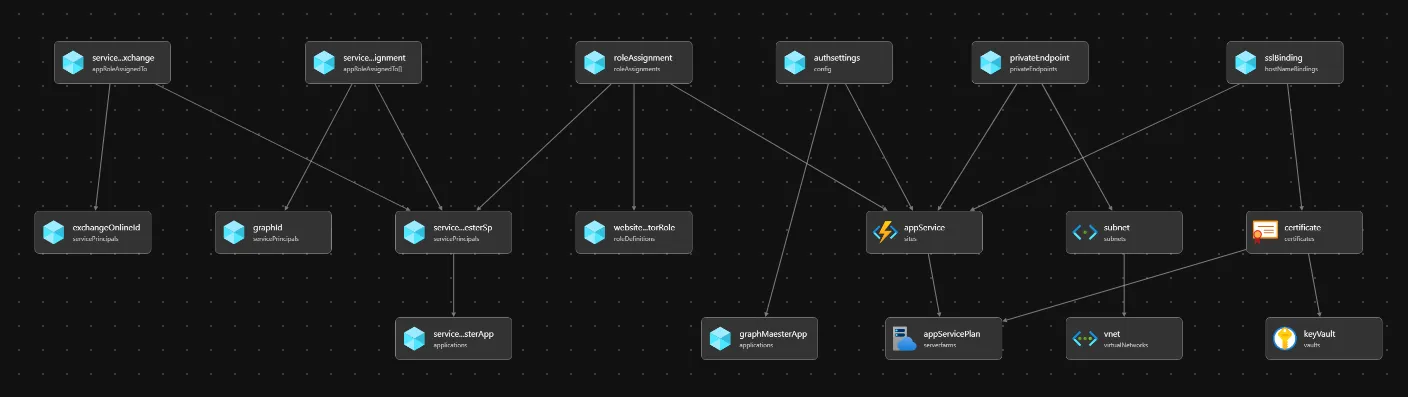
Pre-requisites
Section titled “Pre-requisites”- If this is your first time using Microsoft Azure, you must set up an Azure Subscription so you can create resources and are billed appropriately.
- You must have the Global Administrator OR Privileged Role Administrator and Application Administrator role in your Entra tenant. This is so the necessary permissions can be consented to the Workload Identity that Azure DevOps will use and the Maester WebApp.
- You must also have Azure Bicep & Azure CLI installed on your machine, this can be easily done with, using the following commands:
winget install -e --id Microsoft.AzureCLIwinget install -e --id Microsoft.BicepOptional pre-requisites
Section titled “Optional pre-requisites”- Exchange Online tests will require that you have Exchange Administrator role in your Entra tenant. This is so the necessary permissions can be manually assigned to the Workload Identity that Azure DevOps will use. After creation of the workload identity for the Azure DevOps service connection you can run the following commands to assign the role View-only Configuration:
# Creates the Service Principal object in Exchange OnlineNew-ServicePrincipal -AppId <Application ID> -ObjectId <Object ID> -DisplayName <ApppDisplayName># Assigns the 'View-Only Configuration' role to the workload identityNew-ManagementRoleAssignment -Role "View-Only Configuration" -App <ApppDisplayName>-
Security & Compliance (IPPS) tests require that you have Global Administrator OR Privileged Role Administrator and Application Administrator role in your Entra tenant. This is so the Security Role can be manually assigned to the Workload Identity that Azure DevOps will use.
-
Microsoft Teams tests require that you have Global Administrator OR Privileged Role Administrator and Application Administrator role in your Entra tenant. This is so the Teams Administrator can be manually assigned to the Workload Identity that Azure DevOps will use.
Template Walkthrough
Section titled “Template Walkthrough”This section will guide you through the template required to deploy Maester on Azure. Depending on your needs, this can be done locally or through CI/CD pipelines.
- For instance, using your favorite IDE such as VS Code.
- Alternatively, through Azure DevOps.
To be able to declare Microsoft Graph resources in a Bicep file, you need to specify the Microsoft Graph Bicep type versions by configuring bicepconfig.json.
{ "extensions": { "microsoftGraphV1": "br:mcr.microsoft.com/bicep/extensions/microsoftgraph/v1.0:1.0.0" } }The main.bicep template holds all the resources in Azure and Graph to be provisioned.
extension microsoftGraphV1
@description('Web app name')@minLength(2)param webAppName string = 'app-maester-${uniqueString(subscription().id)}'
@description('Location for all resources')param location string = resourceGroup().location
@description('The public network access of the web app')@allowed([ 'Enabled' 'Disabled'])param publicNetworkAccess string = 'Enabled'
param environment string = 'prod'
param certificateResource certificateResourceType?
param subnetResource subnetResourceType?
param __maesterAppRoles__ array = [ 'Directory.Read.All' 'DirectoryRecommendations.Read.All' 'IdentityRiskEvent.Read.All' 'Policy.Read.All' 'Policy.Read.ConditionalAccess' 'Reports.Read.All' 'RoleEligibilitySchedule.Read.Directory' 'RoleManagement.Read.All' 'RoleManagementAlert.Read.Directory' 'SecurityIdentitiesSensors.Read.All' 'SecurityIdentitiesHealth.Read.All' 'SharePointTenantSettings.Read.All' 'ThreatHunting.Read.All' 'UserAuthenticationMethod.Read.All']
param registerExchangeOnlinePermission bool = false
@allowed([ 'F1' 'B1' 'P1v3' 'I1v2' 'FC1'])@description('The name of the SKU will Determine the tier, size, family of the App Service Plan. Default value is B1')param skuASPName string = 'B1'@description('Optional. Number of workers associated with the App Service Plan. This defaults to 3, to leverage availability zones.')param skuASPCapacity int = 3
resource keyVault 'Microsoft.KeyVault/vaults@2024-04-01-preview' existing = if (!empty(certificateResource)) { name: certificateResource.keyVaultName scope: resourceGroup( certificateResource.?subscriptionId ?? subscription().subscriptionId, certificateResource.?resourceGroupName ?? resourceGroup().name )}
resource vnet 'Microsoft.Network/virtualNetworks@2024-05-01' existing = if (!empty(subnetResource)) { name: subnetResource.vnetName scope: resourceGroup( subnetResource.?subscriptionId ?? subscription().subscriptionId, subnetResource.?resourceGroupName ?? resourceGroup().name )}
resource subnet 'Microsoft.Network/virtualNetworks/subnets@2024-05-01' existing = if (!empty(subnetResource)) { name: subnetResource.subnetName parent: vnet}
resource appServicePlan 'Microsoft.Web/serverfarms@2024-04-01' = { name: 'asp-maester-${environment}' location: location kind: 'linux' sku: { name: skuASPName capacity: skuASPName == 'FC1' ? null : skuASPCapacity tier: skuASPName == 'FC1' ? 'FlexConsumption' : null }}
uniqueName: 'app-maester-${environment}' signInAudience: 'AzureADMyOrg' displayName: 'app-maester-${environment}' web: { redirectUris: [ 'https://${webAppName}.azurewebsites.net/.auth/login/aad/callback' ] implicitGrantSettings: { enableIdTokenIssuance: true enableAccessTokenIssuance: false } } requiredResourceAccess: [ { resourceAppId: '00000003-0000-0000-c000-000000000000' // Microsoft Graph resourceAccess: [ { id: 'e1fe6dd8-ba31-4d61-89e7-88639da4683d' // User.Read type: 'Scope' } ] } ]}
@description('This is the built-in Website Contributor. See https://learn.microsoft.com/en-us/azure/role-based-access-control/built-in-roles/web-and-mobile#website-contributor')resource websiteContributorRole 'Microsoft.Authorization/roleDefinitions@2018-01-01-preview' existing = { scope: subscription() name: 'de139f84-1756-47ae-9be6-808fbbe84772'}
resource roleAssignment 'Microsoft.Authorization/roleAssignments@2020-10-01-preview' = { name: guid(appService.id, subscription().id, websiteContributorRole.id) scope: appService properties: { roleDefinitionId: websiteContributorRole.id principalId: serviceConnectionMaesterSp.id principalType: 'ServicePrincipal' }}
uniqueName: 'sc-app-maester-${environment}' signInAudience: 'AzureADMyOrg' displayName: 'sc-app-maester-${environment}'}
@description('Role Assignment Deployment') appId: '00000003-0000-0000-c000-000000000000'}
@description('Role Assignment Deployment')resource exchangeOnlineId 'Microsoft.Graph/[email protected]' existing = if(registerExchangeOnlinePermission) { appId: '00000002-0000-0ff1-ce00-000000000000'}
resource serviceConnectionRoleAssignment 'Microsoft.Graph/[email protected]' = [for appRole in __maesterAppRoles__: { appRoleId: (filter(graphId.appRoles, role => role.value == appRole)[0]).id principalId: serviceConnectionMaesterSp.id resourceId: graphId.id}]
resource serviceConnectionRoleAssignmentExchange 'Microsoft.Graph/[email protected]' = if(registerExchangeOnlinePermission) { appRoleId: (filter(exchangeOnlineId.appRoles, role => role.value == 'Exchange.ManageAsApp')[0]).id principalId: serviceConnectionMaesterSp.id resourceId: exchangeOnlineId.id}
// Identity for the Service Connection App appId: serviceConnectionMaesterApp.appId}
resource appService 'Microsoft.Web/sites@2023-01-01' = { name: webAppName location: location properties: { httpsOnly: true serverFarmId: appServicePlan.id publicNetworkAccess: publicNetworkAccess siteConfig: { appSettings: [ { name: 'WEBSITE_RUN_FROM_PACKAGE' value: '1' } ] minTlsVersion: '1.2' ftpsState: 'FtpsOnly' publicNetworkAccess: publicNetworkAccess defaultDocuments: [ 'index.html' ] } }}
resource authsettings 'Microsoft.Web/sites/config@2022-09-01' = { parent: appService name: 'authsettingsV2' properties: { globalValidation: { redirectToProvider: 'Microsoft' requireAuthentication: true unauthenticatedClientAction: 'RedirectToLoginPage' } identityProviders: { azureActiveDirectory: { enabled: true registration: { clientId: graphMaesterApp.appId openIdIssuer: 'https://sts.windows.net/${subscription().tenantId}/v2.0' clientSecretSettingName: 'MICROSOFT_PROVIDER_AUTHENTICATION_SECRET' } validation: { jwtClaimChecks: {} allowedAudiences: [ 'api://${graphMaesterApp.appId}' ] } } } }}
resource privateEndpoint 'Microsoft.Network/privateEndpoints@2024-05-01' = if (!empty(subnetResource)) { name: 'pep-${appService.name}' location: location properties: { subnet: { id: subnet.id } privateLinkServiceConnections: [ { name: 'pe-sc-${appService.name}' properties: { privateLinkServiceId: appService.id groupIds: ['sites'] } } ] }}
resource certificate 'Microsoft.Web/certificates@2023-12-01' = if (!empty(certificateResource)) { name: '${certificateResource.customHostName}-certificate' location: location properties: { keyVaultId: keyVault.id keyVaultSecretName: certificateResource.certificateReferenceName serverFarmId: appServicePlan.id }}
resource sslBinding 'Microsoft.Web/sites/hostNameBindings@2023-12-01' = if (!empty(certificateResource)) { parent: appService name: certificateResource.customHostName properties: { sslState: 'SniEnabled' thumbprint: certificate.properties.thumbprint }}
type subnetResourceType = { subscriptionId: string? resourceGroupName: string? vnetName: string subnetName: string}?
type certificateResourceType = { @description('Custom host name') customHostName: string @description('Name of the keyvault that holds the certificate') keyVaultName: string @description('The certificate needed for the domain') certificateReferenceName: string @description('The subscription id of where the keyvault resides, Defaults to the same subscription as deployment') subscriptionId: string? @description('The resource group name of where the keyvault resides, Defaults to the same resource group as deployment') resourceGroupName: string?}
output appServiceName string = appService.nameoutput domainVerificationId string = !empty(certificateResource) ? appService.properties.customDomainVerificationId : 'Custom Domain Name not specified'output applicationClientId string = serviceConnectionMaesterApp.appIdoutput applicationRegistrationName string = serviceConnectionMaesterSp.displayNameParameters
Section titled “Parameters”There are multiple parameters that can be defined.
webAppName
Section titled “webAppName”This will define the name of the WebApp to be used for the static web page hosting.
publicNetworkAccess
Section titled “publicNetworkAccess”When set to Enabled, the WebApp will be available through public networking. Set to Disabled to only allow private networking.
environment
Section titled “environment”Environment is used as a suffix for the App service plan, Application registration for the WebApp and for the workload identity used by Azure DevOps.
certificateResource
Section titled “certificateResource”Defines the properties of the certificate that can be used for the WebApp, if a custom domain name is prefered.
subnetResource
Section titled “subnetResource”Defines the properties of a subnet resource, where the private endpoint for the WebApp will be provisioned.
registerExchangeOnlinePermission
Section titled “registerExchangeOnlinePermission”Defines if “Exchange.ManageAsApp” permissions should be assigned to the workload identity towards Exchange Online.
Requirement for Exchange Online / ISSP tests
maesterAppRoles
Section titled “maesterAppRoles”Contains an array with Graph Roles.
skuASPName
Section titled “skuASPName”The name of the SKU used by the App Service Plan.
skuASPCapacity
Section titled “skuASPCapacity”The capacity of the SKU used by the App Service Plan.
The main.bicepparam template defines our input parameters, such as the environment, location, custom domain name, networking options and app roles for the workload identity.
Examples
Section titled “Examples”Public networking and without custom domain name
Section titled “Public networking and without custom domain name”using 'main.bicep'
param publicNetworkAccess = 'Enabled'param environment = 'prod'Public networking and custom domain name
Section titled “Public networking and custom domain name”using 'main.bicep'
param publicNetworkAccess = 'Enabled'param environment = 'prod'param certificateResource = { certificateReferenceName: 'maester-prod' customHostName: 'maester.domainName.domainSuffix' keyVaultName: 'kv-certificate-store' resourceGroupName: 'rg-mgmt-cert-store' subscriptionId: '6e5c9040-f1ad-4028-888d-4f98863e919a'}Private networking and custom domain name
Section titled “Private networking and custom domain name”using 'main.bicep'
param publicNetworkAccess = 'Disabled'param environment = 'prod'param certificateResource = { certificateReferenceName: 'maester-prod' customHostName: 'maester.domainName.domainSuffix' keyVaultName: 'kv-certificate-store' resourceGroupName: 'rg-mgmt-cert-store' subscriptionId: '6e5c9040-f1ad-4028-888d-4f98863e919a'}
param subnetResource = { subnetName: 'snet-pe-001' vnetName: 'vnet-maester-001' resourceGroupName: 'rg-maester-infra'}Maester Deployment
Section titled “Maester Deployment”Deploy the Bicep, using the “main.bicepparam” file and create the Azure DevOps service connection:
$subscriptionId = '5df10289-c03d-4e13-b28b-8c77251a51e7'$resourceGroupName = 'rg-maester-prod'$ADOOrganization = 'contosodevelopment'$ADOProjectName = 'maesterproject'$location = 'westeurope'$bicepparameterFile = 'main.bicepparam'
function New-ADOServiceConnection {    [CmdletBinding()]    param (        # SubscriptionId        [Parameter(Mandatory)]        [string]        $SubscriptionId,
        # SubscriptionName        [Parameter(Mandatory)]        [string]        $SubscriptionName,
        # Entra ID Application Registration Name        [Parameter(Mandatory)]        [string]        $AppRegistrationName,
        # Azure DevOps Service Connection Name        [Parameter(Mandatory)]        [string]        $ServiceConnectionName,
        # Azure DevOps Organization        [Parameter(Mandatory)]        [string]        $ADOOrganization,
        # Azure DevOps Project Name        [Parameter(Mandatory)]        [string]        $ADOProjectName    )
    # The script requires the Az PowerShell Module    if (! (Get-Module 'Az' -ListAvailable)) {        Throw 'Please install the Az PowerShell Module "https://www.powershellgallery.com/packages/Az"'    }
    # The script requires the ADOPS PowerShell Module    if (! (Get-Module 'ADOPS' -ListAvailable)) {        Throw 'Please install the ADOPS PowerShell Module "https://www.powershellgallery.com/packages/ADOPS"'    }
    # Check if the user is already logged in to the Az PowerShell Module.    $AzureContext = Get-AzContext    if (!$AzureContext) {        # User is not logged into Az PowerShell Module        Write-verbose "Please login to the Az PowerShell Module, this is used for confirming the existance of the Application Id and obtain an Azure Access Token" -Verbose        Connect-AzAccount    }
    $Description = "Federated Identity connection for Maester"
    ## Azure    $TenantId = $AzureContext.Tenant.Id
    if ((Get-Module Az.Accounts).Version -lt '4.0.0') {        $AccessToken = $(Get-AzAccessToken).Token    }    else {        $AccessToken = $(Get-AzAccessToken -AsSecureString).Token | ConvertFrom-SecureString -AsPlainText    }
    # Connects to Azure DevOps    Connect-ADOPS -Organization $ADOOrganization -OAuthToken $AccessToken
    # Gets the Azure DevOps project    $AzdoProject = Get-ADOPSProject -Name $ADOProjectName    if (!($AzdoProject)) {        Get-ADOPSProject | Select-Object name, id | Sort-Object Name        Throw "Unable to find $ADOProjectName"    }
    # Gets the Azure DevOps Service Conection, if it already exists.    $AdopsSC = Get-ADOPSServiceConnection -Name $ServiceConnectionName -Project $ADOProjectName -IncludeFailed -ErrorAction SilentlyContinue    if (!($AdopsSC)) {        $Params = @{            TenantId                   = $TenantId            SubscriptionName           = $SubscriptionName            SubscriptionId             = $SubscriptionId            WorkloadIdentityFederation = $true            Project                    = $ADOProjectName            ConnectionName             = $ServiceConnectionName.ToLower()            CreationMode               = 'Manual'            Description                = $Description        }        $AdopsSC = New-ADOPSServiceConnection @Params    }    else {        Write-Verbose "Found '$ServiceConnectionName' in the Project $ADOProjectName" -Verbose    }
    # Creates the Workload identity (Application Registration) using Az Module    $EntraIdAppParams = @{        DisplayName = "$AppRegistrationName".tolower()        Description = "Azure DevOps Service Connection used in '$ADOProjectName' for credential federation."        Confirm     = $false    }    $App = Get-AzADServicePrincipal -DisplayName $EntraIdAppParams.DisplayName    if (!($App)) {        Throw    }    else {        Write-Verbose "The Entra ID Service Principal '$($App.DisplayName)' already exists." -Verbose    }    $AppDetails = Get-AzADApplication -ApplicationId $App.AppId
    # Creates Entra Id Federated Credentials for authentication between Azure DevOps and Entra id using our Workload identity
    $FederatedCreds = Get-AzADAppFederatedCredential -ApplicationObjectId $AppDetails.Id
    if ($AdopsSC.authorization.parameters.workloadIdentityFederationSubject -in $FederatedCreds.Subject) {        Write-Verbose "Azure DevOps Federated Credentials have already been configured." -Verbose    }    else {        $FederatedCredentialsParams = @{            ApplicationObjectId = $AppDetails.Id            Issuer              = $AdopsSC.authorization.parameters.workloadIdentityFederationIssuer            Subject             = $AdopsSC.authorization.parameters.workloadIdentityFederationSubject            Name                = 'AzureDevOpsAuthentication'            Description         = "Azure DevOps Federated Credentials"            Audience            = 'api://AzureADTokenExchange'        }        New-AzADAppFederatedCredential @FederatedCredentialsParams    }
    # Completes the Service connection authentication details in Azure DevOps    $Params = @{        TenantId                          = $TenantId        SubscriptionName                  = $subscriptionName        SubscriptionId                    = $subscriptionId        Project                           = $ADOProjectName        ServiceEndpointId                 = $AdopsSC.Id        ConnectionName                    = $AdopsSC.name        ServicePrincipalId                = $App.AppId        WorkloadIdentityFederationIssuer  = $AdopsSC.authorization.parameters.workloadIdentityFederationIssuer        WorkloadIdentityFederationSubject = $AdopsSC.authorization.parameters.workloadIdentityFederationSubject        Description                       = $Description    }    Set-ADOPSServiceConnection @Params}
# Select Azure Subscription$subscriptionInfo = Select-AzSubscription -Subscription $subscriptionId# Confirm the existance of the Resource Group in selected locationNew-AzResourceGroup -Name $resourceGroupName -location $location -force# Deploy the bicep module$DeploymentInfo = New-AzResourceGroupDeployment -Name 'Maester' -ResourceGroupName $resourceGroupName -TemplateParameterFile $bicepparameterFile
$params = @{    SubscriptionId = $subscriptionInfo.Subscription.Id    SubscriptionName = $subscriptionInfo.Subscription.Name    AppRegistrationName = $DeploymentInfo.outputs.applicationRegistrationName.value    ServiceConnectionName = $DeploymentInfo.outputs.applicationRegistrationName.value    ADOOrganization = $ADOOrganization    ADOProjectName = $ADOProjectName}New-ADOServiceConnection @params
[pscustomobject]@{ 'WebAppSubscriptionId' = $subscriptionInfo.Subscription.Id 'WebAppResourceGroup' = $DeploymentInfo.ResourceGroupName 'WebAppName' = $DeploymentInfo.outputs.appServiceName.value 'TenantId' = $subscriptionInfo.Tenant.Id 'ClientId' = $DeploymentInfo.outputs.applicationClientId.value}Azure DevOps Pipeline
Section titled “Azure DevOps Pipeline”Select/Create a new Azure DevOps repository called “Maester”.
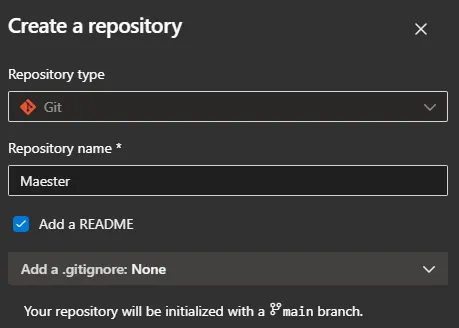
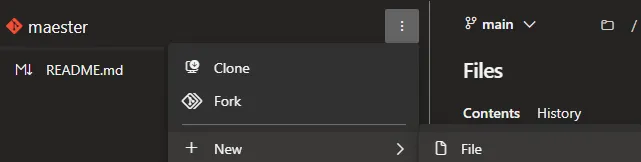
Add the pipeline.yaml file
Import the pipeline in Azure DevOps

Select “Azure Repos Git”
Select the Maester repository
Select “Existing Azure Pipelines YAML file” and select the pipeline.yaml file.
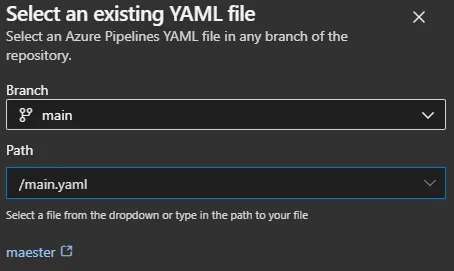
Save the pipeline

Azure DevOps pipeline yaml
Section titled “Azure DevOps pipeline yaml”The Azure DevOps pipeline yaml has been updated to generate an HTML report, which is then zipped. This package is uploaded to the Azure Web App and published using the workload identity using federated credentials configured in Azure DevOps.
trigger: none
variables:  ## Define service connection to be used  ServiceConnection: sc-app-maester-prod  ## Web App information  WebAppSubscriptionId: e687a125-dd45-41af-ac62-42fe38cba48a  WebAppResourceGroup: rg-maester-prod  WebAppName: app-maester-3kl6lixbgbk40  ## Entra information  TenantId: bc81ae6d-e776-4673-a188-881ce2372d96  ClientId: a7918611-949c-4b97-8ae4-f6d84b9130ef  ## Included products (Optional)  IncludeTeams: false  IncludeExchange: false  ## ISSP Configuration requirements (Optional)  IncludeISSP: false  OrganizationName: contoso.onmicrosoft.com
schedules:- cron: "0 0,12 * * *"  displayName: every 12h  always: true  branches:    include:    - main
jobs:- job: maester  timeoutInMinutes: 0
  pool:    vmImage: ubuntu-latest
  steps:  - checkout: self    fetchDepth: 1
  - task: AzurePowerShell@5    inputs:      azureSubscription: '$(ServiceConnection)'      ScriptType: 'InlineScript'      pwsh: true      azurePowerShellVersion: latestVersion      Inline: |        Install-Module 'Maester', 'Pester', 'NuGet', 'PackageManagement', 'Microsoft.Graph.Authentication', 'ExchangeOnlineManagement', 'MicrosoftTeams' -Confirm:$false -Force    displayName: 'Install required modules'
  - task: AzurePowerShell@5    inputs:      azureSubscription: '$(ServiceConnection)'      ScriptType: 'InlineScript'      pwsh: true      azurePowerShellVersion: latestVersion      Inline: |        # Define script variables        $appName = "$(WebAppName)"        $resourceGroupName = "$(WebAppResourceGroup)"        $includeExchange = [bool]::parse('$(IncludeExchange)')        $IncludeTeams = [bool]::parse('$(IncludeTeams)')        $IncludeISSP = [bool]::parse('$(IncludeISSP)')        $TenantId = '$(TenantId)'        $ClientId = '$(ClientId)'
        # Connect to Microsoft Graph using Federated Credentials        Write-verbose "Fetch a token to connect to Microsoft Graph API" -verbose        $graphToken = Get-AzAccessToken -ResourceUrl 'https://graph.microsoft.com' -AsSecureString        Write-verbose "Connecting to Microsoft Graph API" -verbose        Connect-MgGraph -AccessToken $graphToken.Token -NoWelcome
        # Check if we need to connect to Exchange Online        if ($IncludeExchange) {            Import-Module ExchangeOnlineManagement            Write-verbose "Connecting to Exchange Online using Federated Credentials" -verbose            $outlookToken = (ConvertFrom-SecureString -SecureString (Get-AzAccessToken -ResourceUrl 'https://outlook.office365.com' -AsSecureString).Token -AsPlainText)            Connect-ExchangeOnline -AccessToken $outlookToken -AppId $ClientId -Organization $TenantId -ShowBanner:$false
            # Check if we need to connect to ISSP            if ($IncludeISSP) {              Write-Verbose "Connecting to Security and Compliance PowerShell..."  -Verbose              $ISSPToken = (ConvertFrom-SecureString -SecureString (Get-AzAccessToken -ResourceUrl 'https://ps.compliance.protection.outlook.com' -AsSecureString).Token -AsPlainText)              Connect-IPPSSession -AccessToken $ISSPToken -Organization '$(OrganizationName)'            }
        } else {            Write-Verbose 'Exchange Online & ISSP tests will be skipped.' -Verbose        }
        # Check if we need to connect to Teams        if ($IncludeTeams) {            Import-Module MicrosoftTeams            Write-verbose "Connecting to Teams using Federated Credentials" -verbose            $teamsToken = Get-AzAccessToken -ResourceUrl '48ac35b8-9aa8-4d74-927d-1f4a14a0b239' -AsSecureString            $regularGraphToken = ConvertFrom-SecureString -SecureString $graphToken.Token -AsPlainText            $teamsTokenPlainText = ConvertFrom-SecureString -SecureString $teamsToken.Token -AsPlainText            $tokens = @($regularGraphToken, $teamsTokenPlainText)            Connect-MicrosoftTeams -AccessTokens $tokens -Verbose        } else {            Write-Verbose 'Teams tests will be skipped.' -Verbose        }
        # Create output folder        $date = (Get-Date).ToString("yyyyMMdd-HHmm")        $FileName = "MaesterReport" + $date + ".zip"
        Write-verbose "Installing Maester tests from GitHub" -verbose        # Run Maester report        md maester-tests        cd maester-tests        $TempOutputFolder = 'temp' + $date        if (!(Test-Path $TempOutputFolder -PathType Container)) {            New-Item -ItemType Directory -Force -Path $TempOutputFolder            New-Item -ItemType File -Force -Path $TempOutputFolder -name "index.html"        }        Install-MaesterTests .\tests
        # Invoke Maester for HTML page        Write-verbose "Running Maester tests" -verbose        Invoke-Maester -OutputHtmlFile "$TempOutputFolder/index.html"
        # Create the zip file        Write-verbose "Compressing Maester results to a zip file for zip-deployment" -verbose        Compress-Archive -Path "$TempOutputFolder/*" -DestinationPath $FileName
        Select-AzSubscription -Subscription '$(WebAppSubscriptionId)'
        # Publish to Azure Web App <3        Write-verbose "Publishing zip file to $appName" -verbose        Publish-AzWebApp -ResourceGroupName $resourceGroupName -Name $appName -ArchivePath $FileName -Force    displayName: 'Run Maester tests and upload result to web app'
Viewing the Azure Resources
Section titled “Viewing the Azure Resources”We can see the resources located in the resource group.

The schedule of the Azure DevOps trigger, which will trigger every 12th hour to upload new Maester report to the Azure Web App.
Adjust the schedule to suit your needs.
schedules:- cron: "0 0,12 * * *" displayName: every 12h always: true branches: include: - mainViewing the Azure Web App
Section titled “Viewing the Azure Web App”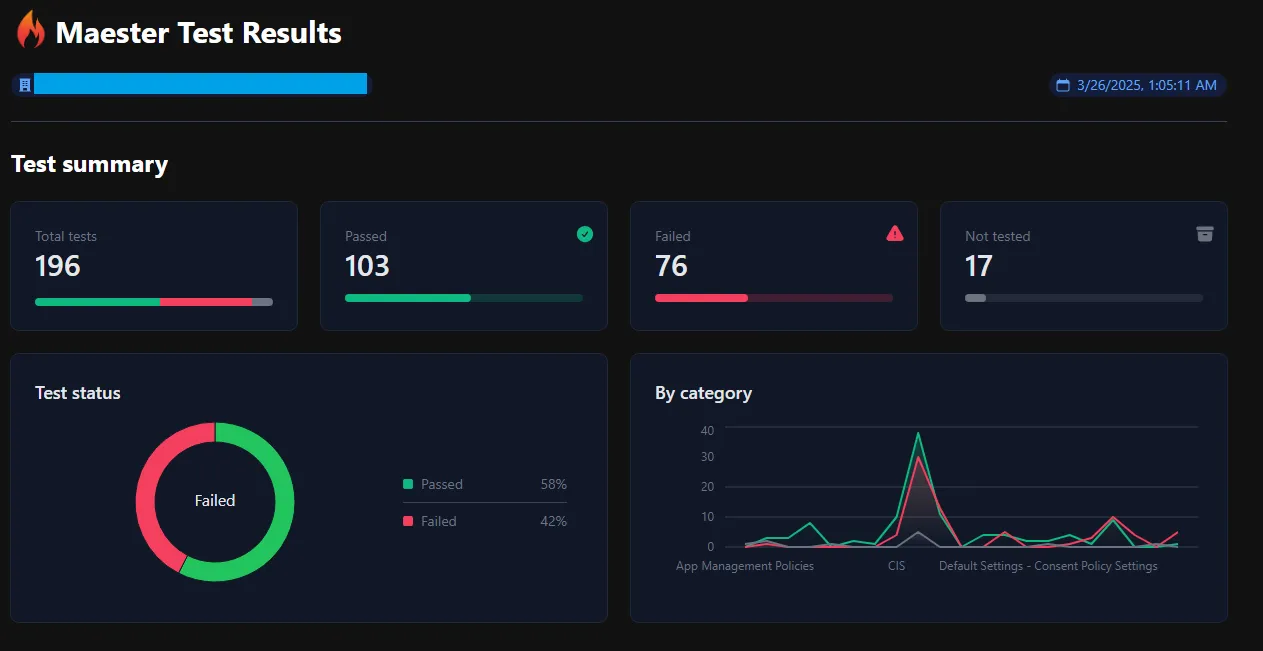
FAQ / Troubleshooting
Section titled “FAQ / Troubleshooting”- Ensure you have the latest version of Azure Bicep, as the
microsoftGraphV1_0module depends on the newer versions - If Exchange Online tests are failing, ensure you have set
registerExchangeOnlinePermissionto true in the bicep parameter file.